
GEN 365
แอปสำหรับลูกค้า GeneraliThe app for Generali customers
ทุกเรื่องง่าย เพียงปลายนิ้วThe world at your fingertips
ใช้ GEN 365 เพื่อดูข้อมูลกรมธรรม์ ยื่นและติดตามเคลม ชำระเบี้ย ดาวน์โหลดหนังสือรับรองภาษี ค้นหาโรงพยาบาลในเครือ 750 แห่ง และใช้สิทธิพิเศษภายในแอปUse GEN 365 to view policy information, submit and track claims, pay premiums, download tax certificates, find network hospitals, and access privileges in one app.
 สแกนเพื่อดาวน์โหลดScan to download
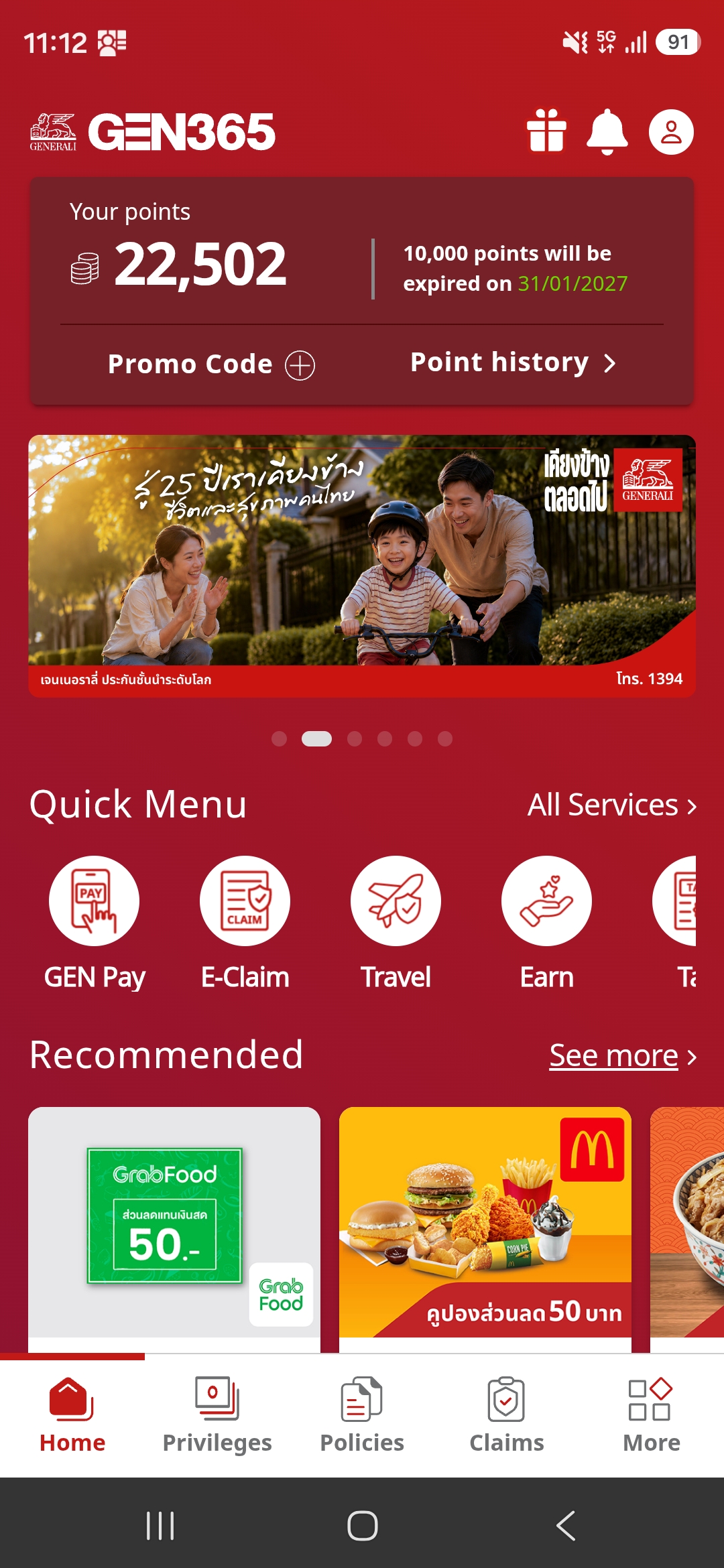
บริการบน GEN 365Services on GEN 365
Everything you need from your Generali policy — in one app
ข้อมูลกรมธรรม์และความคุ้มครองPolicy Information & Coverage
ดูข้อมูลกรมธรรม์ทุกผลิตภัณฑ์ที่ยังมีผลบังคับ ทั้งประกันรายบุคคลและประกันกลุ่มView all your in-force policies, both individual and group insurance.
เคลมออนไลน์ (e-Claim)Online Claim (e-Claim)
ยื่นเคลมสุขภาพและอุบัติเหตุ พร้อมติดตามสถานะและประวัติการเคลมย้อนหลังSubmit health and accident claims, then track status and claim history.
โรงพยาบาลในเครือ 750+ แห่ง750+ Network Hospitals
ค้นหาโรงพยาบาลใกล้ฉัน เรียงตามพื้นที่ หรือค้นหาด้วยชื่อโรงพยาบาลFind hospitals near you, browse by area, or search by hospital name.
e-Care Card
บัตรประกันสุขภาพดิจิทัล แสดงสิทธิและความคุ้มครองได้ทันทีจากมือถือYour digital health card — show your coverage instantly from your phone.
ชำระเบี้ยออนไลน์ (GenPay)Online Premium Payment (GenPay)
ชำระเบี้ยงวดแรกและงวดต่ออายุ ทั้งของตนเองและของคนในครอบครัวPay first and renewal premiums for yourself and your family.
หนังสือรับรองลดหย่อนภาษีTax Certificate
เลือกปีภาษีย้อนหลังได้ 5 ปี ส่งเข้าอีเมลหรือบันทึกลงเครื่องได้ทันทีChoose up to 5 tax years, then send to your email or save to your device.
ข้อมูลยูนิตลิงค์Unit Linked
ดูข้อมูลการลงทุน สับเปลี่ยนกองทุน และดาวน์โหลดสเตทเมนต์View your investments, switch funds, and download statements.
e-Policy กรมธรรม์อิเล็กทรอนิกส์e-Policy
เลือกรับ e-Policy และเปิดดูเอกสารกรมธรรม์ในแอปได้ โดยไม่ต้องรอเอกสารฉบับกระดาษ ปลอดภัย ไม่สูญหาย และเป็นมิตรกับสิ่งแวดล้อมGet your policy instantly — no waiting for paper. Safe, never lost, and eco-friendly.
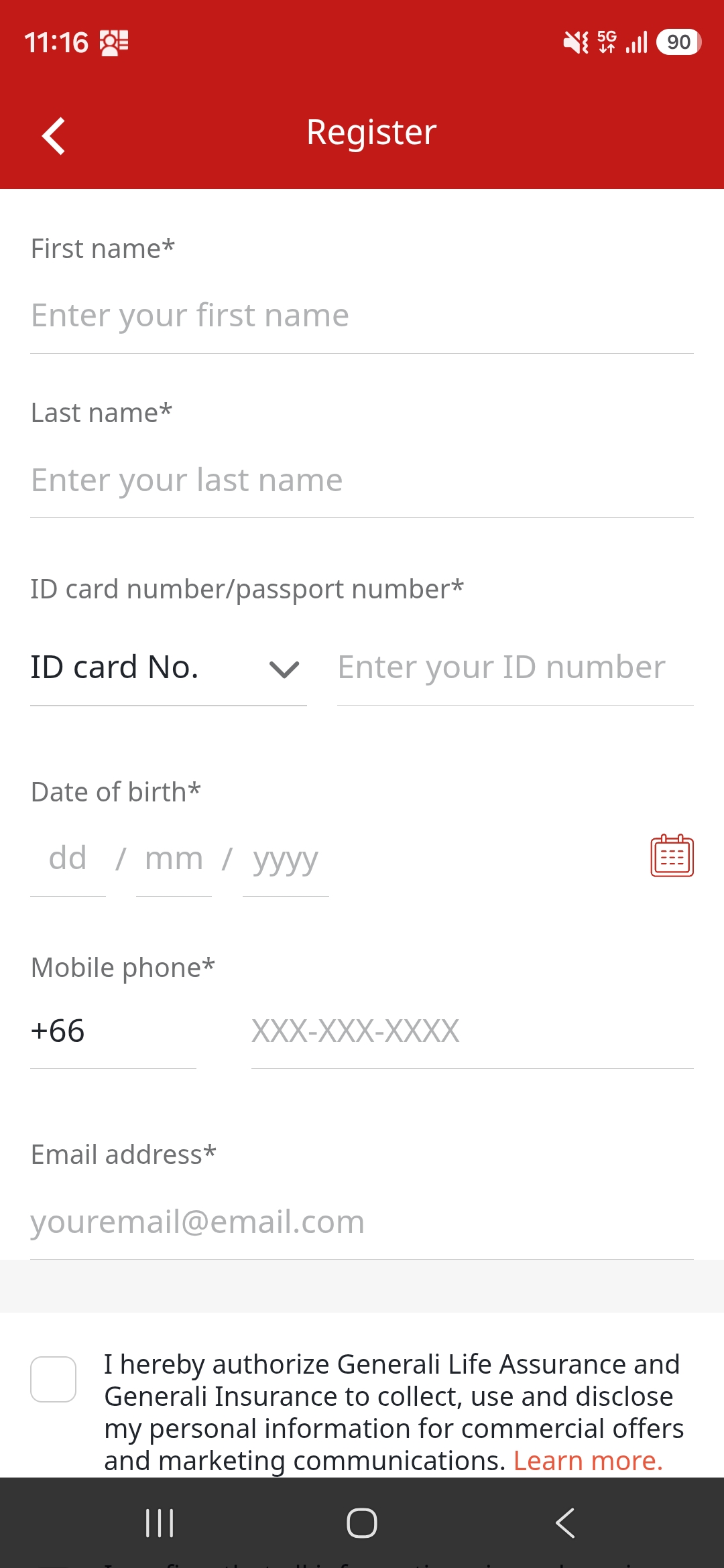
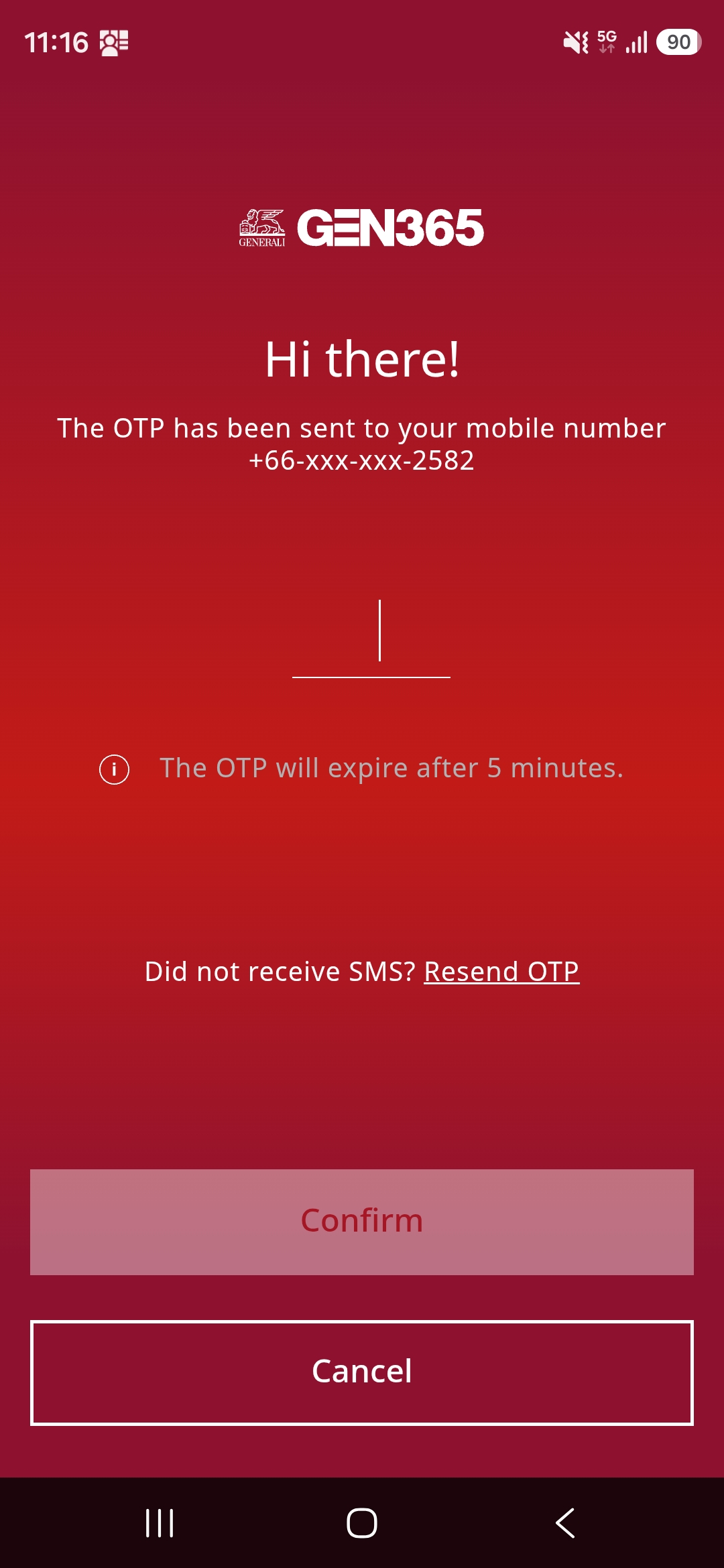
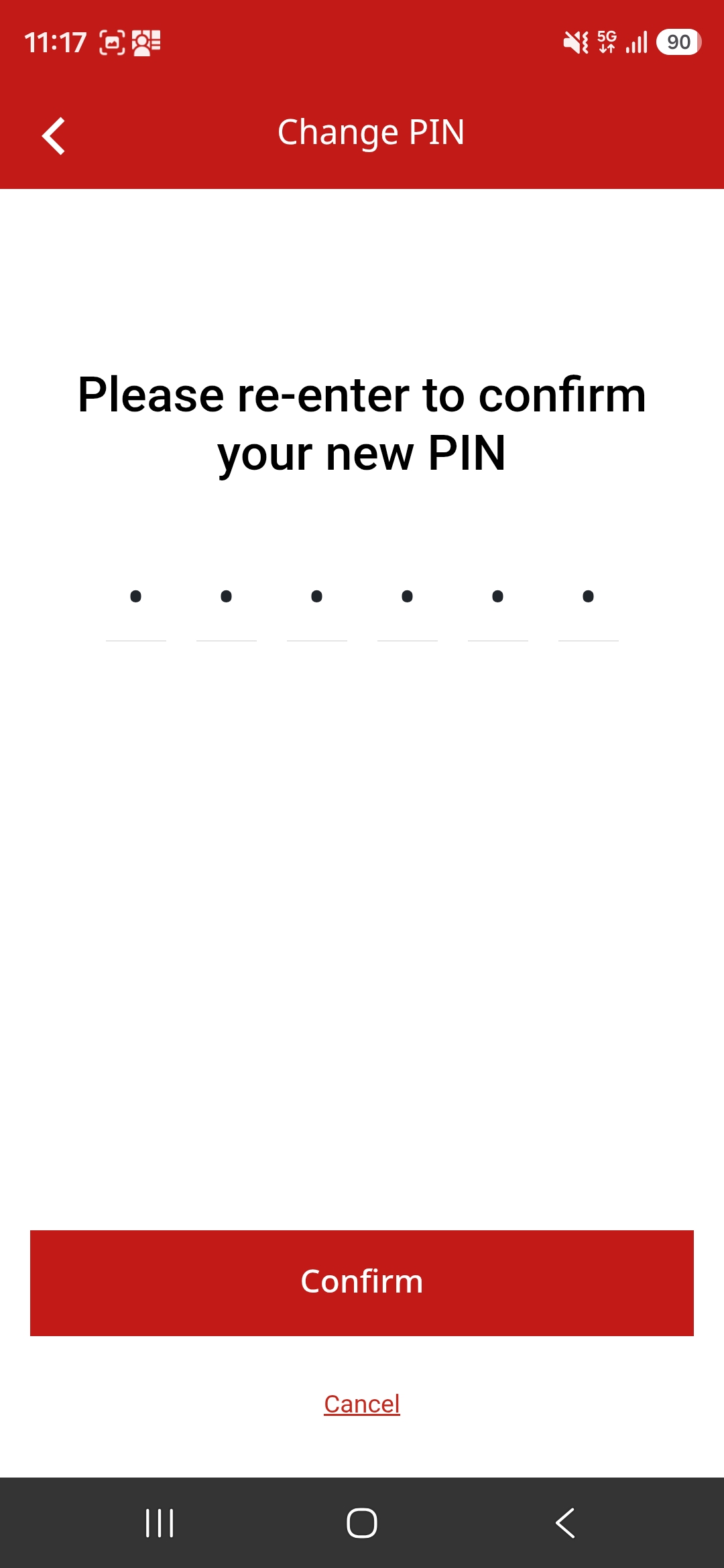
วิธีลงทะเบียนใช้งาน GEN 365How to register for GEN 365
How to register — 1 mobile number per 1 account1 mobile number per 1 account
เลือก "ลงทะเบียน"Choose "Register"
กรอกเลขบัตรประชาชนหรือหมายเลขหนังสือเดินทางของผู้เอาประกันEnter the insured's national ID or passport number.
กรอกข้อมูลและยืนยันFill in & consent
ชื่อ-นามสกุล วันเดือนปีเกิด เบอร์มือถือ อีเมล พร้อมยอมรับข้อกำหนดและเงื่อนไขName, date of birth, mobile number and email, then accept the terms and conditions.
เข้าสู่ระบบด้วย OTPLog in with OTP
กรอกเบอร์มือถือที่ลงทะเบียนไว้ แล้วยืนยันด้วยรหัส OTP (มีอายุ 5 นาที)Enter your registered mobile number and confirm with the OTP (valid for 5 minutes).
ตั้งรหัส PIN 6 หลักSet up your 6-digit PIN
ใช้ PIN เพื่อเข้าดูข้อมูลกรมธรรม์ การเคลม และหน้าโปรไฟล์Use your PIN to view policy, claim and profile information.
ข้อมูลกรมธรรม์ ความคุ้มครอง และผลประโยชน์Policy information, coverage and benefits
ประกันรายบุคคลIndividual Insurance
ดูรายละเอียดกรมธรรม์ที่ยังมีผลบังคับ (In force) และตรงกับเลขบัตรประชาชน/พาสปอร์ตที่ลงทะเบียนไว้View details of in-force policies that match your registered national ID or passport.
- เลขที่กรมธรรม์ ทุนประกัน เบี้ยประกัน และวันครบกำหนดชำระงวดถัดไปPolicy number, sum insured, premium and next due date
- ประกันชีวิต สินเชื่อคุ้มครอง (Credit Life) สุขภาพ อุบัติเหตุส่วนบุคคล และโรคร้ายแรงLife, Credit Life, Health, Personal Accident and Critical Illness
- e-Care Card สำหรับกรมธรรม์ที่มีความคุ้มครองสุขภาพเพิ่มเติมe-Care Card for policies with health riders
- ดาวน์โหลด e-Policy และเอกสารกรมธรรม์อิเล็กทรอนิกส์Download your e-Policy and policy documents
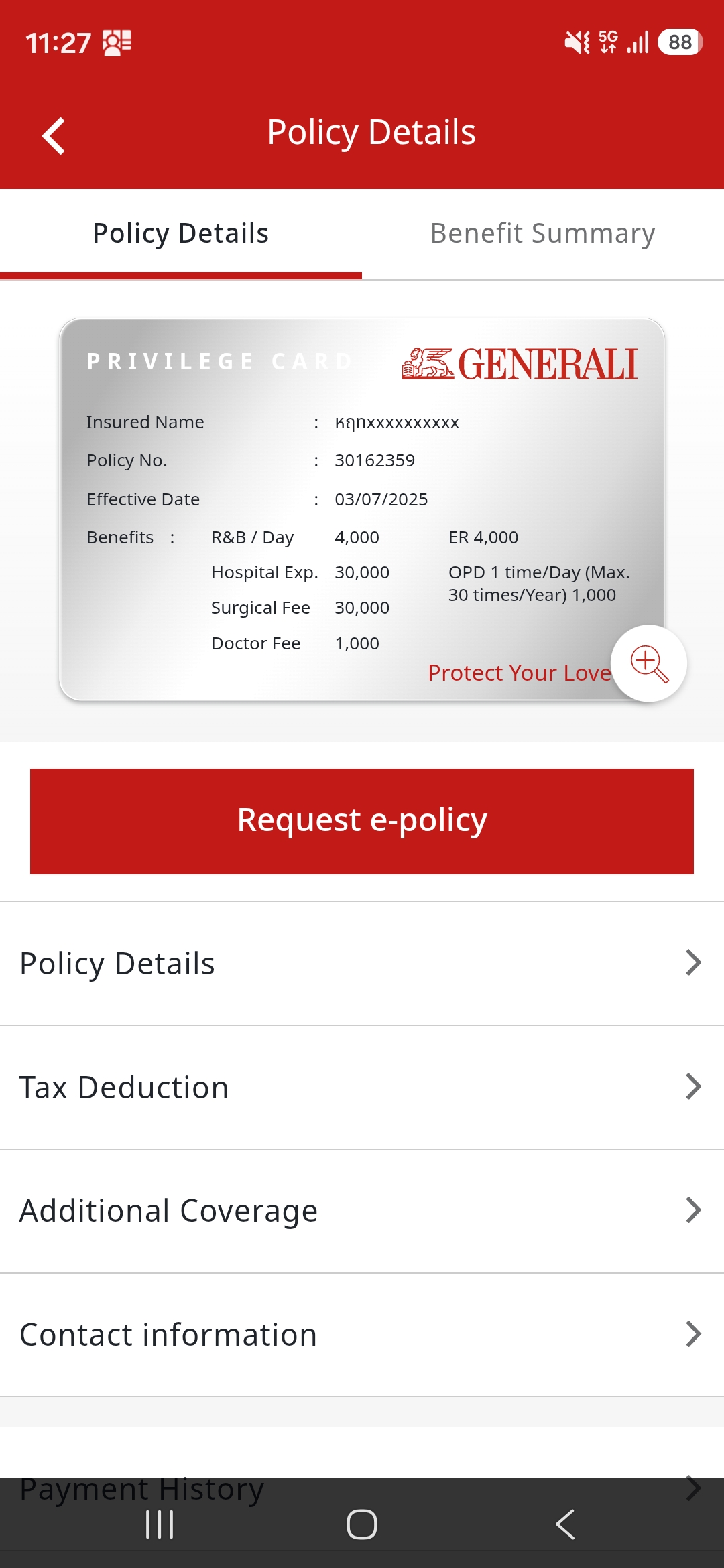
ประกันกลุ่มพนักงาน และครอบครัวEmployee Benefit & Family Coverage
ลูกค้าประกันกลุ่มสามารถลงทะเบียนเพื่อดูความคุ้มครองของตนเอง คู่สมรส และบุตรได้Group insurance members can register to view coverage for themselves, their spouse and children.
- e-Care Card แสดงหมายเลขสมาชิกและสรุปผลประโยชน์ รองรับทั้งแบบ GL (IPD) และ AS (OPD)e-Care Card shows your member number and benefit summary for both GL (IPD) and AS (OPD)
- ดาวน์โหลดหนังสือรับรองการเอาประกันและคู่มือสวัสดิการพนักงานDownload your insurance certificate and employee benefit guide
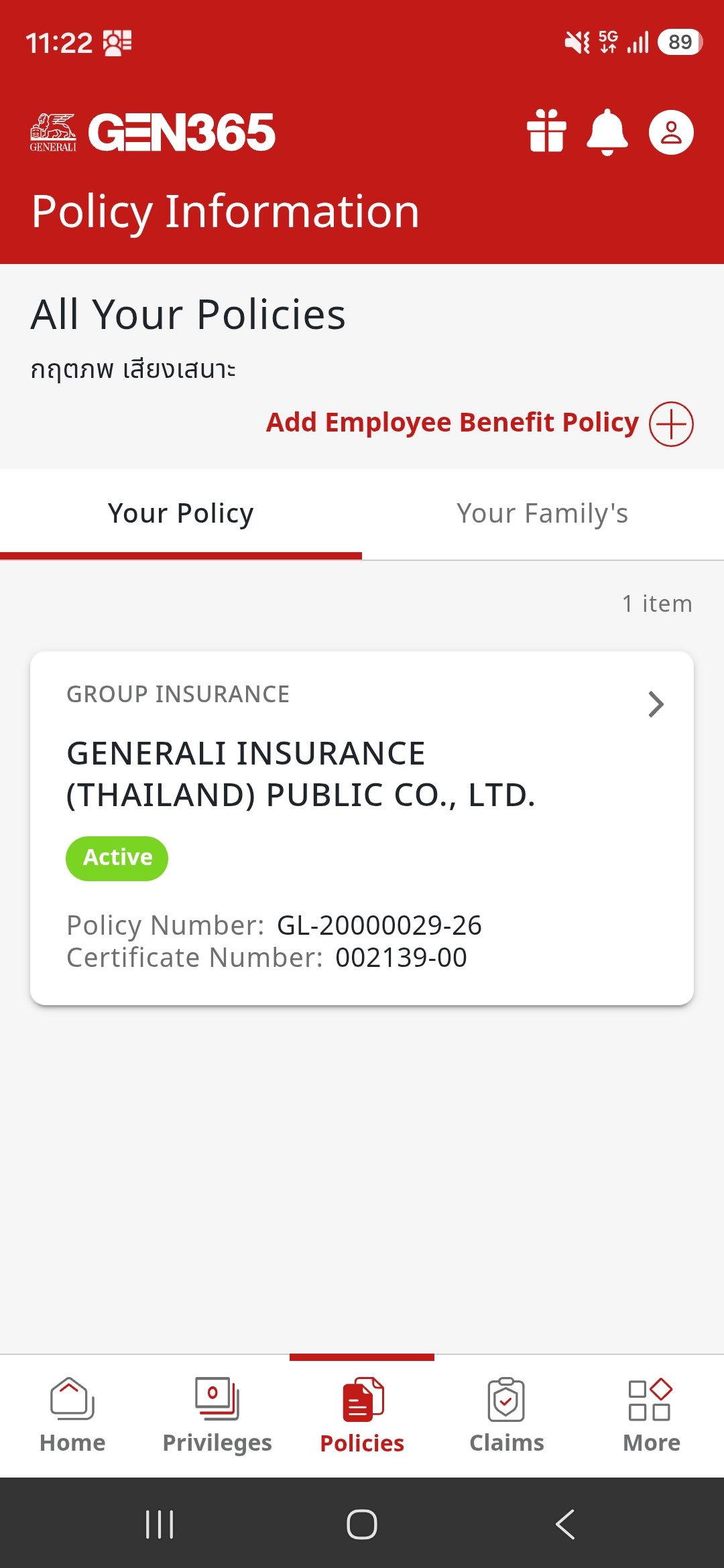
- หากไม่พบข้อมูล เพิ่มเองได้ที่ กรมธรรม์ > เพิ่มข้อมูลประกันกลุ่ม ด้วยเลขที่กรมธรรม์กลุ่มและหมายเลขสมาชิกCan't find your policy? Add it via Policy > Add Group Insurance using your group policy number and member number
- คู่สมรสและบุตรลงทะเบียนแยกด้วยเบอร์โทรศัพท์ของตนเอง (ลงท้าย 01 = คู่สมรส, 02–09 = บุตร)Spouse and children register separately with their own phone numbers (member no. ending 01 = spouse, 02–09 = children)
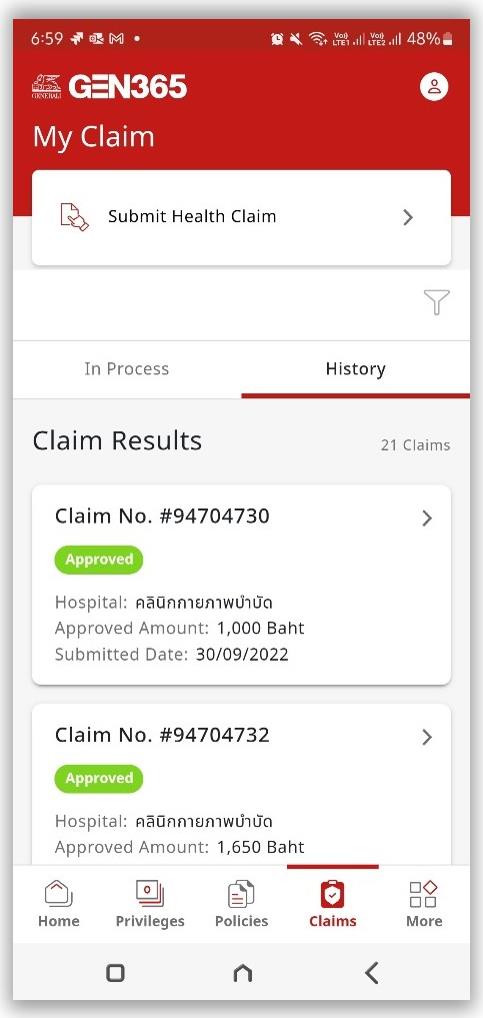
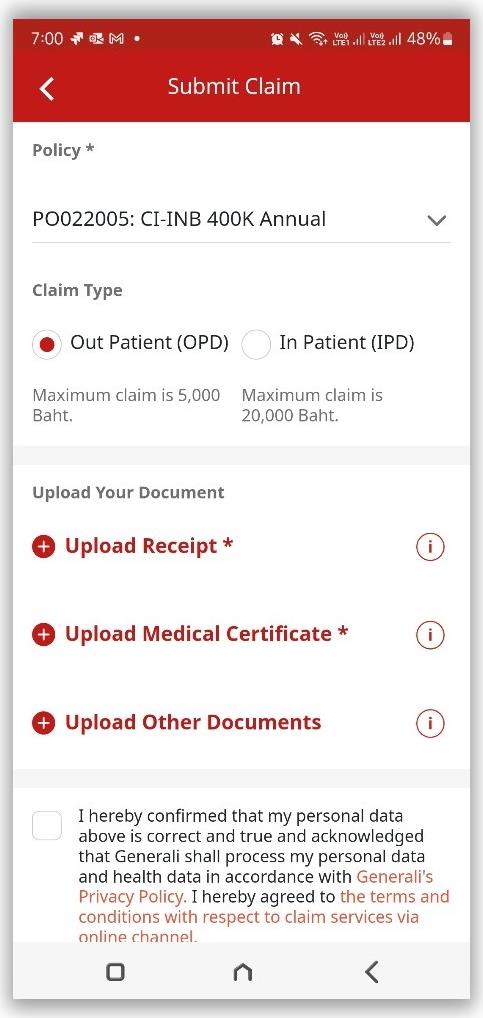
ยื่นเคลมออนไลน์ และติดตามสถานะได้ด้วยตัวเองSubmit claims online and track them yourself
Submit health & accident claims and track status in the app
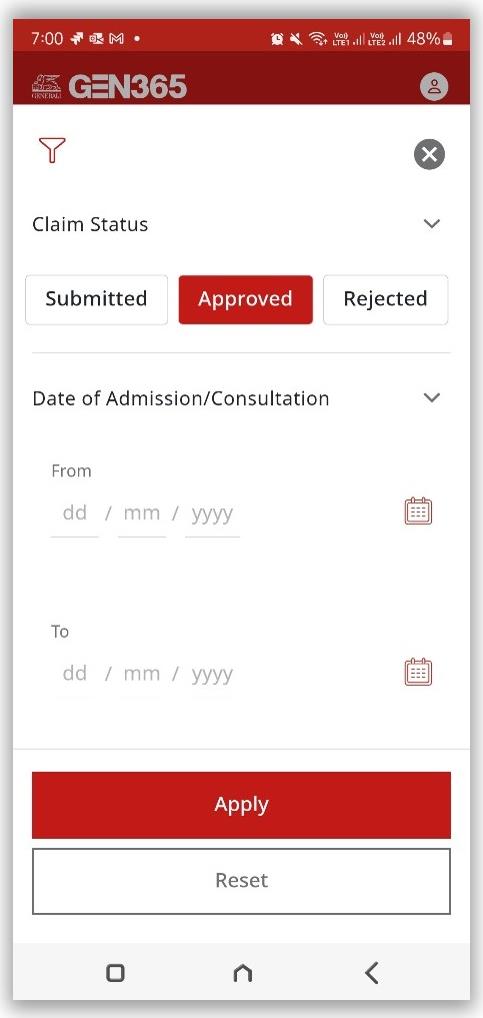
- เลือกเมนู เคลม เพื่อดูสถานะและประวัติการเคลม พร้อมตัวกรองตามสถานะGo to Claim to see claim status and history, with filters by status
- สถานะจะอัปเดตภายใน 3 วันทำการหลังยื่นเอกสารStatus updates within 3 business days after submission
- เลือก ยื่นเคลม และแนบเอกสารที่จำเป็นผ่านแอปTap Submit Claim and upload the required documents in the app
- รองรับการยื่นเคลมแทนสมาชิกในครอบครัว (เฉพาะประกันกลุ่ม)Submit claims on behalf of family members (group insurance only)
- ครอบคลุมทั้งประกันรายบุคคลและประกันกลุ่มAvailable for both individual and group insurance
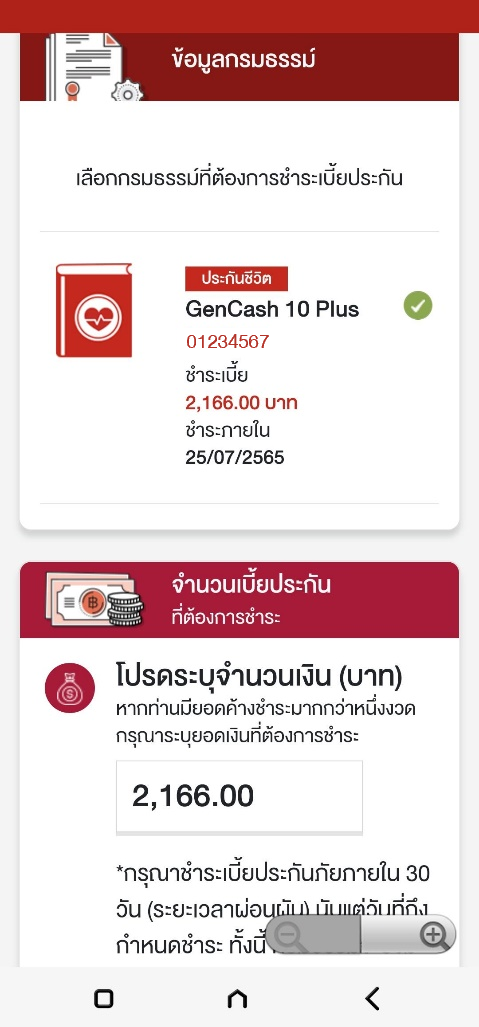
วิธีชำระเบี้ยประกันผ่าน GenPayHow to pay your premium with GenPay
Pay your first or renewal premium — Life Insurance onlyFirst or renewal premium — Life Insurance only
เลือก GenPayChoose GenPay
จากหน้าหลักหรือเมนูอื่น ๆ แล้วเลือกชำระงวดแรก (ซ้าย) หรือชำระงวดต่ออายุ (ขวา)From Home or More, choose first premium (left) or renewal premium (right).
กรอกข้อมูลFill in details
งวดแรก: เลขใบคำขอ ชื่อ-นามสกุลผู้เอาประกัน และจำนวนเงิน / งวดต่ออายุ: เลือกจากรายการกรมธรรม์First premium: application number, insured's name and amount / Renewal: select from your policy list.
ชำระแทนผู้อื่นได้Pay for others
กรอกเลขที่กรมธรรม์และระบุความสัมพันธ์ (บิดามารดา คู่สมรส หรือบุตรตามกฎหมาย)Enter the policy number and relationship (parents, spouse or legal children).
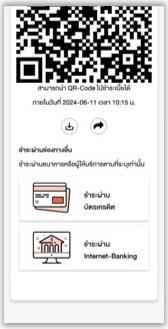
เลือกช่องทางชำระเงินChoose payment method
QR Code บัตรเครดิต หรือ Internet Banking เมื่อสำเร็จจะได้รับอีเมลยืนยันทันทีQR Code, credit card or Internet Banking. You'll get a confirmation email right away.

หนังสือรับรองภาษีTax Certificate
เมนูอื่น ๆ > ลดหย่อนภาษี เลือกปีภาษีและกรมธรรม์ (หรือเลือกทั้งหมด) ส่งเข้าอีเมลหรือบันทึกลงเครื่อง ย้อนหลังได้ 5 ปี รวมปีภาษีปัจจุบันMore > Tax Deduction. Choose the tax year and policy (or all), then email or save it. Up to 5 years including the current year.
ค้นหาโรงพยาบาลFind a Hospital
ค้นหาจากโรงพยาบาลใกล้ฉัน เรียงตามพื้นที่ หรือพิมพ์ชื่อโรงพยาบาล จากเครือข่ายกว่า 750 แห่งSearch nearby, by area, or by name across 750+ network hospitals.
Telemedicine
เมนูอื่น ๆ > Telemedicine เพื่อดูรายละเอียดบริการปรึกษาแพทย์ทางไกลMore > Telemedicine to see details of remote doctor consultation.
e-Policy
เลือกรับ e-Policy ตั้งแต่ขั้นตอนสมัคร และเปิดดูเอกสารได้จากเมนูกรมธรรม์ในแอปChoose e-Policy during application and view the document from the Policy menu in the app.
สิทธิพิเศษและคะแนนสะสมตลอดทั้งปีPrivileges and reward points all year round
Privileges throughout the year
คะแนนต้อนรับสมาชิกใหม่Welcome points
ลงทะเบียนสำเร็จพร้อมข้อมูลกรมธรรม์ที่มีผลบังคับเป็นครั้งแรก (ครั้งเดียว อายุ 90 วัน)Register successfully with an in-force policy for the first time (one-time, valid 90 days).
ทุกการชำระเบี้ยประกันOn every premium payment
รับคะแนนเมื่อชำระเบี้ยกรมธรรม์ที่ร่วมรายการ อัตรา 10 บาท = 1 คะแนน หรือ 1 บาท = 1 คะแนน แตกต่างกันตามผลิตภัณฑ์Earn points when paying premiums on participating policies: 10 THB = 1 point or 1 THB = 1 point, depending on the product.
คะแนนทุกปีที่ต่ออายุEvery renewal year
รับคะแนนทุกปีที่บริษัทต่ออายุกรมธรรม์ประกันกลุ่มEarn points every year your company renews its group policy.
คะแนนพิเศษจากแคมเปญCampaign bonus points
ร่วมกิจกรรมพิเศษรายเดือน เช่น บริจาคโลหิต ซื้อผักผลไม้ หรืออุปกรณ์กีฬา รับคะแนนภายใน 15 วันทำการJoin monthly activities such as blood donation or buying fruit, vegetables or sports gear. Points credited within 15 business days.
ตรวจสอบคะแนนสะสมCheck your points
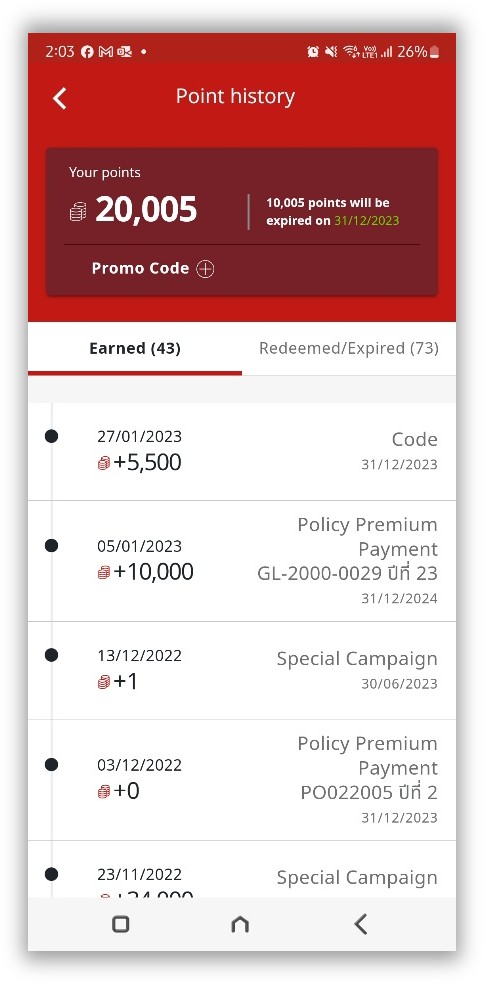
ดูคะแนนทั้งหมดของคุณได้ในที่เดียว ทั้งคะแนนจากการชำระเบี้ย แคมเปญ และคะแนนต้อนรับSee all your points in one place — from premium payments, campaigns and welcome points.
- หน้าหลัก > ประวัติคะแนน > คะแนนที่ได้รับ (แถบซ้าย)Home > Points History > Points Earned (left tab)
- แสดงประเภทคะแนน เลขที่กรมธรรม์ ปีที่ได้รับ และวันหมดอายุของแต่ละรายการShows point type, policy number, year earned and expiry date for each item
- ดูคะแนนที่ใช้ไปหรือหมดอายุได้ในแถบด้านขวาSee used or expired points in the right tab
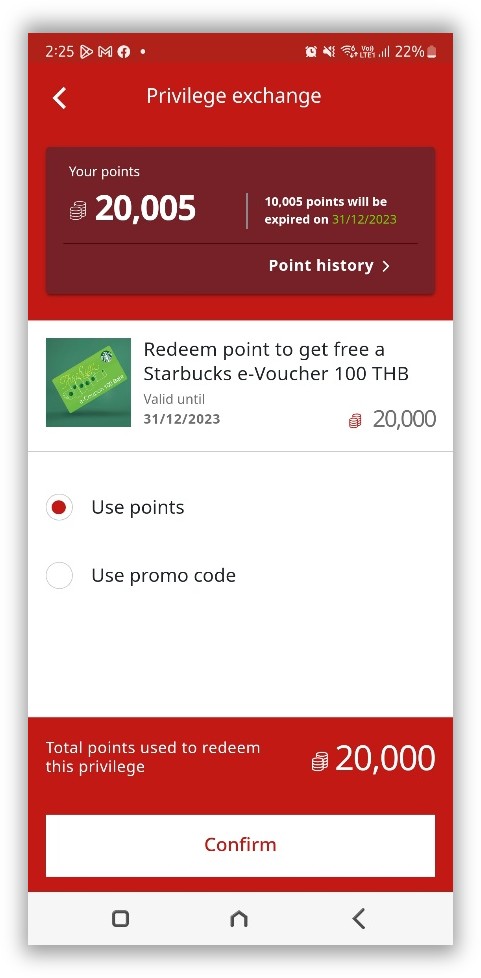
วิธีแลกสิทธิพิเศษHow to redeem
- รับที่ร้านค้า: เลือกสิทธิพิเศษ > ใช้คะแนนหรือ Promo Code > แสดงโค้ด/QR/บาร์โค้ดกับร้านค้าAt the shop: Choose a privilege > use points or a Promo Code > show the code/QR/barcode at the shop
- จัดส่งถึงบ้าน: ยืนยันที่อยู่จัดส่ง รับของภายใน 20 วันทำการHome delivery: Confirm your address and receive it within 20 business days
- ตรวจสุขภาพ: เลือก Gen Health Care > เลือกแพ็กเกจ > รอเอกสารยืนยันทางอีเมลภายใน 3 วันทำการHealth check-up: Choose Gen Health Care > select a package > get email confirmation within 3 business days
- Promo Code: กด Promo Code > กรอกโค้ด > ตรวจสอบได้ที่ประวัติการแลกสิทธิ์Promo Code: Tap Promo Code > enter the code > check it in Redemption History
คำถามที่พบบ่อยFrequently asked questions
Frequently asked questions about GEN 365
ดาวน์โหลดแอป GEN 365 ได้อย่างไรHow do I download GEN 365?
ลงทะเบียนแล้วไม่พบข้อมูลกรมธรรม์ ต้องทำอย่างไรI registered but can't find my policy. What should I do?
- เลือก เพิ่มข้อมูลประกันกลุ่ม ที่มุมขวาบนของเมนูกรมธรรม์
- ตรวจสอบกับ HR ว่ามีการเปลี่ยนแปลงหมายเลขสมาชิกกรมธรรม์หรือไม่
- หากยังไม่สำเร็จ ติดต่อศูนย์ลูกค้าสัมพันธ์ 1394 (ทุกวัน เวลา 8.30 – 20.00 น.)
- Tap Add Group Insurance at the top right of the Policy menu
- Check with your HR whether your member number has changed
- If it still doesn't work, call Customer Relations at 1394 (daily, 8.30 – 20.00)
ทำไมต้องกรอก PIN ก่อนดูข้อมูลบางหน้าWhy do I need a PIN to view some pages?
เคลมประเภทใดบ้างที่ยื่นผ่านแอปได้What types of claims can I submit in the app?
GenPay รองรับกรมธรรม์ประเภทใดWhich policies can I pay with GenPay?
ดูประวัติการได้คะแนนจากการชำระเบี้ยได้ที่ไหนWhere can I see points earned from premium payments?
- ประเภทคะแนนที่ได้รับ เช่น จากแคมเปญ หรือจากกรมธรรม์
- เลขที่กรมธรรม์และปีที่ได้รับ
- วันหมดอายุของคะแนนแต่ละรายการ
- Point type, e.g. from a campaign or a policy
- Policy number and year earned
- Expiry date of each item
ของรางวัลที่แลกจัดส่งภายในกี่วันHow long does delivery take for home-delivery rewards?
ต้องการเปลี่ยนเบอร์โทรศัพท์หรือข้อมูลส่วนตัวทำอย่างไรHow do I change my phone number or personal details?
ติดต่อเราContact us
Customer First — here for you every day, 8.30 – 20.00- เบอร์โทรศัพท์ที่ลงทะเบียน GEN 365
- ชื่อ – นามสกุล
- เลขที่กรมธรรม์ (และหมายเลขสมาชิกสำหรับประกันกลุ่ม)
- เลขบัตรประชาชน
- วันเดือนปีเกิด
- ภาพหน้าจอ (Screenshots)
- Phone number registered with GEN 365
- Full name
- Policy number (and member number for group insurance)
- National ID number
- Date of birth
- Screenshots